---
title: How do I delete a lab?
description: Only the subscription owner or organisation admin can delete a Calira lab. Go to Settings and scroll to the bottom to find the delete option.
---
[Skip to content](https://help.calira.co/how-do-i-delete-a-lab#main-content)
[](https://calira.co/)
Open main navigation
Close main navigation
- [Contact us](https://calira.co/contact)
[Contact us](https://calira.co/contact)
How can we help you?
- There are no suggestions because the search field is empty.
1. [Calira help centre | Guides and support](https://help.calira.co/?hsLang=en)
2. [Troubleshooting](https://help.calira.co/troubleshooting?hsLang=en)
# How do I delete a lab?
Only the lab subscription owner, or organisation admin in case of Enterprise subscriptions, can delete a lab account.
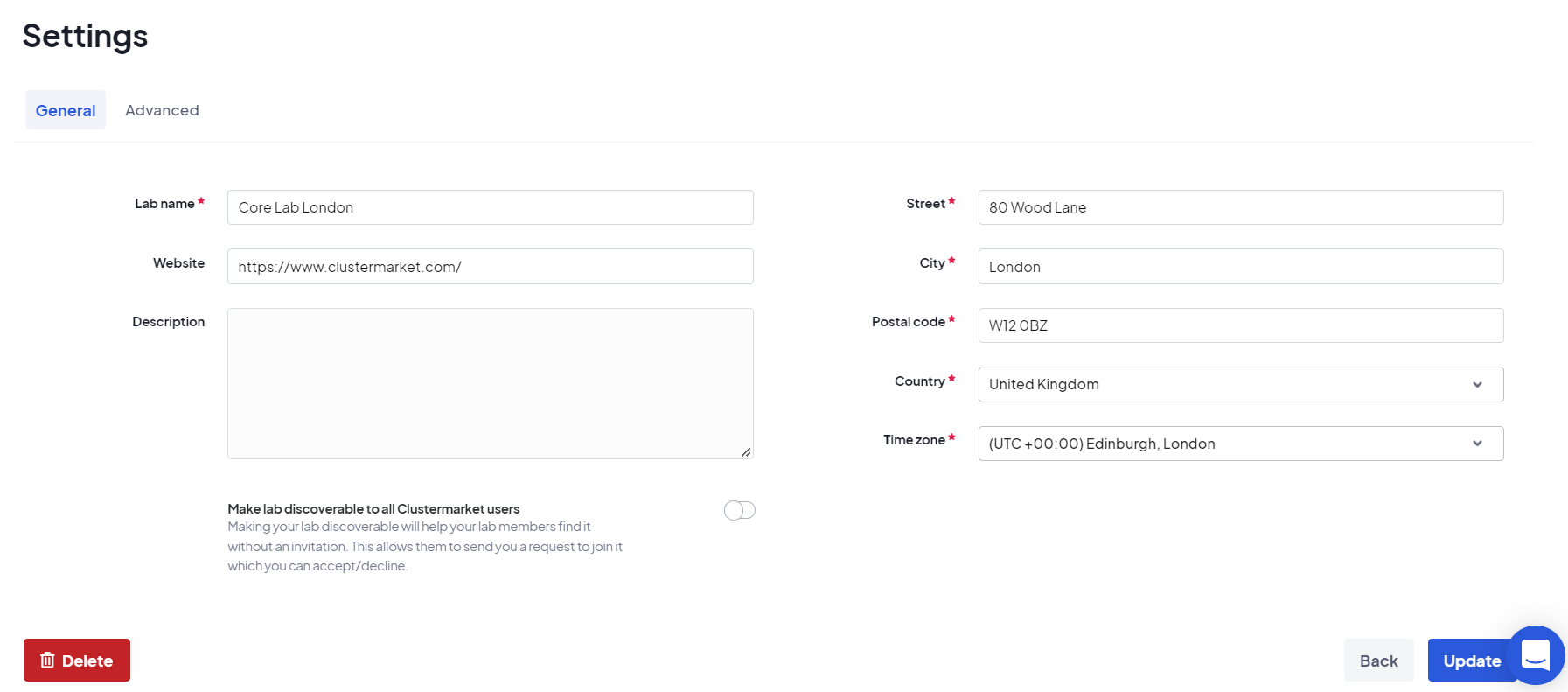
To delete a lab, please go to *Settings* (cogwheel icon at the top right of the lab dashboard page) and click the red button that says *Delete* - see below image for reference. If you want to remove yourself from a lab, kindly contact the lab admin or send us an email at support@calira.co and we will help you.
[](https://downloads.intercomcdn.com/i/o/530536323/dadaf99e41a0e850a8bde972/Settings+screenshot.png?expires=1741083300&signature=08f329820c0a446707ae36a4e9e8fd47343ceaa5dd18072695afc6f7e96c012c&req=cSMnE8p4noNcFb4f3HP0gCbgbu5ceO3zx%2B9LYXIjxE3FKhnF19%2BwQd7I8ODO%0APjyuXdtyBKl%2FFohDYA%3D%3D%0A)
- [About Calira](https://help.calira.co/about-calira?hsLang=en)
- [Account](https://help.calira.co/account?hsLang=en)
- [Announcements](https://help.calira.co/announcements?hsLang=en)
- [Bookings](https://help.calira.co/bookings?hsLang=en)
- [Custom Forms](https://help.calira.co/custom-forms?hsLang=en)
- [Data and Safety](https://help.calira.co/data-and-safety?hsLang=en)
- [Equipment](https://help.calira.co/equipment?hsLang=en#main-content)
- [Creating Equipment](https://help.calira.co/equipment?hsLang=en#creating-equipment)
- [Charging For Equipment](https://help.calira.co/equipment?hsLang=en#charging-for-equipment)
- [Equipment Booking Rules](https://help.calira.co/equipment?hsLang=en#equipment-booking-rules)
- [Integrations](https://help.calira.co/integrations?hsLang=en#main-content)
- [Calira API](https://help.calira.co/integrations?hsLang=en#calira-api)
- [Benchling Integration](https://help.calira.co/integrations?hsLang=en#benchling-integration)
- [External Calendars](https://help.calira.co/integrations?hsLang=en#external-calendars)
- [LabTrack Integration](https://help.calira.co/integrations?hsLang=en#labtrack-integration)
- [Single Sign-On (SSO)](https://help.calira.co/integrations?hsLang=en#single-sign-on-sso)
- [Asset Monitoring Integrations](https://help.calira.co/integrations?hsLang=en#asset-monitoring-integrations)
- [Electronic Lab Notebooks (ELN's)](https://help.calira.co/integrations?hsLang=en#electronic-lab-notebooks-elns)
- [Maintenance](https://help.calira.co/maintenance?hsLang=en)
- [Projects](https://help.calira.co/projects?hsLang=en)
- [Reports](https://help.calira.co/reports?hsLang=en)
- [Subscriptions & Billing](https://help.calira.co/subscriptions-billing?hsLang=en)
- [System Information](https://help.calira.co/system-information?hsLang=en)
- [Troubleshooting](https://help.calira.co/troubleshooting?hsLang=en)
- [Users](https://help.calira.co/users?hsLang=en#main-content)
- [Inviting New Users](https://help.calira.co/users?hsLang=en#inviting-new-users)
- [User Training](https://help.calira.co/users?hsLang=en#user-training)
- [Assigning Equipment to a User](https://help.calira.co/users?hsLang=en#assigning-equipment-to-a-user)
- [Workflows](https://help.calira.co/workflows?hsLang=en)
[.svg "Chill listening crop-3")](https://calira.co/)
Clustermarket Ltd (trading as Calira) is a company registered in England and Wales (No.09485659). Registered office: 34 Lime Street, London, EC3M 7AT, United Kingdom.
[mailto:support@calira.co](mailto:support@calira.co)
Copyright © 2026, Calira
```json
{
"@context" : "https://schema.org",
"@id" : "https://calira.co/#organization",
"@type" : "Organization",
"logo" : "https://cdn.prod.website-files.com/68824ff75537b66dd8766992/69f9f2bbb669ebffba10349e_calira-logo.png",
"name" : "Calira",
"sameAs" : [ "https://www.linkedin.com/company/calira/", "https://www.crunchbase.com/organization/calira" ],
"url" : "https://calira.co"
}
```
```json
{
"@context" : "https://schema.org",
"@id" : "https://help.calira.co/#website",
"@type" : "WebSite",
"inLanguage" : "en-GB",
"name" : "Calira help centre",
"publisher" : {
"@id" : "https://calira.co/#organization"
},
"url" : "https://help.calira.co"
}
```
```json
{
"@context" : "https://schema.org",
"@type" : "TechArticle",
"about" : {
"@id" : "https://calira.co/#software"
},
"author" : {
"@id" : "https://calira.co/#organization"
},
"dateModified" : "2026-04-28T14:23:20+00:00",
"datePublished" : "",
"description" : "Only the subscription owner or organisation admin can delete a Calira lab. Go to Settings and scroll to the bottom to find the delete option.",
"headline" : "How do I delete a lab?",
"inLanguage" : "en-GB",
"isPartOf" : {
"@id" : "https://help.calira.co/#website"
},
"mainEntityOfPage" : "https://help.calira.co/how-do-i-delete-a-lab",
"publisher" : {
"@id" : "https://calira.co/#organization"
},
"url" : "https://help.calira.co/how-do-i-delete-a-lab"
}
```