---
title: How can I add a new card payment method for my subscription?
description: Learn how to add or update your credit card payment details in Calira so you can pay subscription invoices directly from your account.
---
[Skip to content](https://help.calira.co/how-can-i-add-a-new-card-payment-method-for-my-subscription#main-content)
[](https://calira.co/)
Open main navigation
Close main navigation
- [Contact us](https://calira.co/contact)
[Contact us](https://calira.co/contact)
How can we help you?
- There are no suggestions because the search field is empty.
1. [Calira help centre | Guides and support](https://help.calira.co/?hsLang=en)
2. [Subscriptions & Billing](https://help.calira.co/subscriptions-billing?hsLang=en)
# How can I add a new card payment method for my subscription?
## Add credit card details to your account for paying invoices
To add a new card payment method to your account, please follow the below steps:
For a single lab subscription:
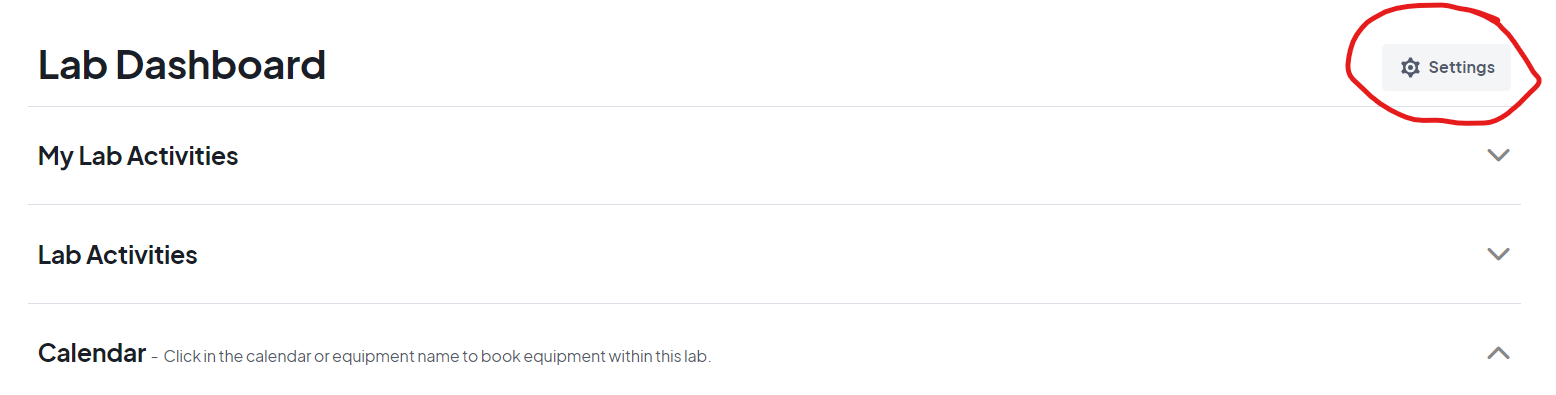
- Select the lab settings button, located on the right hand side of the lab dashboard page.
[](https://clustermarket-81c19fb5e183.intercom-attachments-7.com/i/o/995854623/5c07906181de15adb1052b8b/hp2hE1SYPa5wB038r_b7WP65NYQPXhyNoe1Pc-zAaIvdJeG06Aq1kI5i5jYF_0j7Yfqoq1Cv3kt-AcvCPfZ_rHBZTSDy6d__micsBi0-87N_tjwgXY5ynz0CgIEXi5NhywWVDZ-MIRaahR9qWwT3C9c?expires=1741083300&signature=bd5add0a6d994896fa48ea32dbf146ba45a88957f22c8d8634e16b8b340e719f&req=fSkiHsx6m4NcFb4f3HP0gG810Sf9ojW4YIm89uxoNb8GZ44rk9SIoiKo6YA1%0ASg4%3D%0A)
Select the lab settings button, located on the right hand side of the lab dashboard page.
[](https://clustermarket-81c19fb5e183.intercom-attachments-7.com/i/o/995854623/5c07906181de15adb1052b8b/hp2hE1SYPa5wB038r_b7WP65NYQPXhyNoe1Pc-zAaIvdJeG06Aq1kI5i5jYF_0j7Yfqoq1Cv3kt-AcvCPfZ_rHBZTSDy6d__micsBi0-87N_tjwgXY5ynz0CgIEXi5NhywWVDZ-MIRaahR9qWwT3C9c?expires=1741083300&signature=bd5add0a6d994896fa48ea32dbf146ba45a88957f22c8d8634e16b8b340e719f&req=fSkiHsx6m4NcFb4f3HP0gG810Sf9ojW4YIm89uxoNb8GZ44rk9SIoiKo6YA1%0ASg4%3D%0A)
For Enterprise subscriptions:
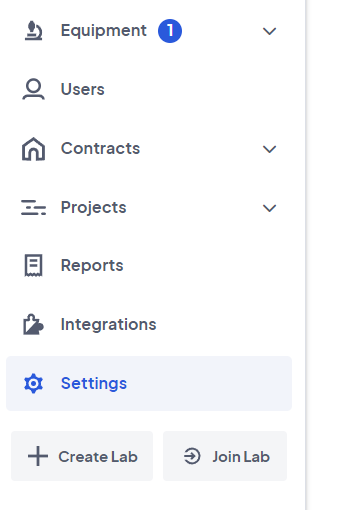
- The settings for the subscription are located at the bottom of the left hand menu for the organisation admin. Then follow the same steps as above.
The settings for the subscription are located at the bottom of the left hand menu for the organisation admin. Then follow the same steps as above.
[](https://clustermarket-81c19fb5e183.intercom-attachments-7.com/i/o/995854652/189b15d472e044678fb8f4fc/QLiaSGzDeHgNjEuMZLm36ThvGhICc5vS6Ttt45W5dqOEcrrOJg-x0cES4WJy19Twe5YcSVqYOchW-HDg4R5LMYKg3cpN5Gerve7X0HeaIIzJlqhqJFrUMImTKArHdifYLOpwgxw145nzOUMCDqq3juE?expires=1741083300&signature=b313b6d02c94cfd33e936ba190330f7c9671d0fa3a19ddcffaf79e0ee7831c1d&req=fSkiHsx6m4RdFb4f3HP0gOFWXSNafsMdtpTAqLyVLIjk4E7PsAJbb%2B4ZHlTG%0AVFRN0%2BVWHLOVSYbvkg%3D%3D%0A)
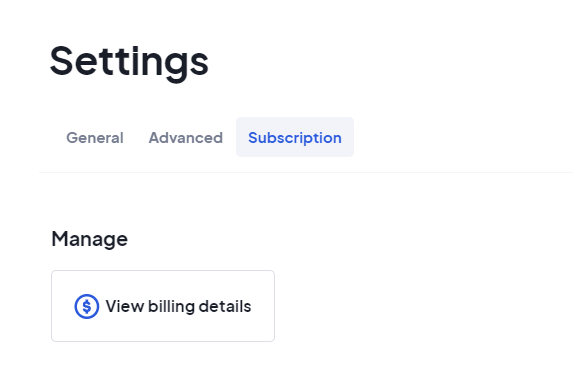
- In the lab settings, select the Subscription tab and click View Billing Details.
[](https://clustermarket-81c19fb5e183.intercom-attachments-7.com/i/o/995854640/4ed8a6a25fa3c15d6f8dec00/uYETLvWwHDYl-4vKV1X4FliTcE2Y99bL7MMDEpY9YUBs_NKr1f9ueG4JTs3QjzBN1yG21qAhhPerd8WaBZ2xWgTLgQAtnv6d-NXqyALCljfHtXz83Vp3kmfyj4z7EUYH8XYwqjesk5ORRdU_dVq_Z00?expires=1741083300&signature=088d082a4d84affb79930e39e36cdab6ef944f606d8d3db9bdd15ea275d1dcdd&req=fSkiHsx6m4VfFb4f3HP0gLpd9ZMsODBNXaOhKyDXP%2B8sEzVcujVKRkq00voN%0A6Ao%3D%0A)
- This will open in a new tab the Calira billing portal. Click on the Payment Methods option on the menu and input your card details here.
In the lab settings, select the Subscription tab and click View Billing Details.
[](https://clustermarket-81c19fb5e183.intercom-attachments-7.com/i/o/995854640/4ed8a6a25fa3c15d6f8dec00/uYETLvWwHDYl-4vKV1X4FliTcE2Y99bL7MMDEpY9YUBs_NKr1f9ueG4JTs3QjzBN1yG21qAhhPerd8WaBZ2xWgTLgQAtnv6d-NXqyALCljfHtXz83Vp3kmfyj4z7EUYH8XYwqjesk5ORRdU_dVq_Z00?expires=1741083300&signature=088d082a4d84affb79930e39e36cdab6ef944f606d8d3db9bdd15ea275d1dcdd&req=fSkiHsx6m4VfFb4f3HP0gLpd9ZMsODBNXaOhKyDXP%2B8sEzVcujVKRkq00voN%0A6Ao%3D%0A)
This will open in a new tab the Calira billing portal. Click on the Payment Methods option on the menu and input your card details here.
- [About Calira](https://help.calira.co/about-calira?hsLang=en)
- [Account](https://help.calira.co/account?hsLang=en)
- [Announcements](https://help.calira.co/announcements?hsLang=en)
- [Bookings](https://help.calira.co/bookings?hsLang=en)
- [Custom Forms](https://help.calira.co/custom-forms?hsLang=en)
- [Data and Safety](https://help.calira.co/data-and-safety?hsLang=en)
- [Equipment](https://help.calira.co/equipment?hsLang=en#main-content)
- [Creating Equipment](https://help.calira.co/equipment?hsLang=en#creating-equipment)
- [Charging For Equipment](https://help.calira.co/equipment?hsLang=en#charging-for-equipment)
- [Equipment Booking Rules](https://help.calira.co/equipment?hsLang=en#equipment-booking-rules)
- [Integrations](https://help.calira.co/integrations?hsLang=en#main-content)
- [Calira API](https://help.calira.co/integrations?hsLang=en#calira-api)
- [Benchling Integration](https://help.calira.co/integrations?hsLang=en#benchling-integration)
- [External Calendars](https://help.calira.co/integrations?hsLang=en#external-calendars)
- [LabTrack Integration](https://help.calira.co/integrations?hsLang=en#labtrack-integration)
- [Single Sign-On (SSO)](https://help.calira.co/integrations?hsLang=en#single-sign-on-sso)
- [Asset Monitoring Integrations](https://help.calira.co/integrations?hsLang=en#asset-monitoring-integrations)
- [Electronic Lab Notebooks (ELN's)](https://help.calira.co/integrations?hsLang=en#electronic-lab-notebooks-elns)
- [Maintenance](https://help.calira.co/maintenance?hsLang=en)
- [Projects](https://help.calira.co/projects?hsLang=en)
- [Reports](https://help.calira.co/reports?hsLang=en)
- [Subscriptions & Billing](https://help.calira.co/subscriptions-billing?hsLang=en)
- [System Information](https://help.calira.co/system-information?hsLang=en)
- [Troubleshooting](https://help.calira.co/troubleshooting?hsLang=en)
- [Users](https://help.calira.co/users?hsLang=en#main-content)
- [Inviting New Users](https://help.calira.co/users?hsLang=en#inviting-new-users)
- [User Training](https://help.calira.co/users?hsLang=en#user-training)
- [Assigning Equipment to a User](https://help.calira.co/users?hsLang=en#assigning-equipment-to-a-user)
- [Workflows](https://help.calira.co/workflows?hsLang=en)
[.svg "Chill listening crop-3")](https://calira.co/)
Clustermarket Ltd (trading as Calira) is a company registered in England and Wales (No.09485659). Registered office: 34 Lime Street, London, EC3M 7AT, United Kingdom.
[mailto:support@calira.co](mailto:support@calira.co)
Copyright © 2026, Calira
```json
{
"@context" : "https://schema.org",
"@id" : "https://calira.co/#organization",
"@type" : "Organization",
"logo" : "https://cdn.prod.website-files.com/68824ff75537b66dd8766992/69f9f2bbb669ebffba10349e_calira-logo.png",
"name" : "Calira",
"sameAs" : [ "https://www.linkedin.com/company/calira/", "https://www.crunchbase.com/organization/calira" ],
"url" : "https://calira.co"
}
```
```json
{
"@context" : "https://schema.org",
"@id" : "https://help.calira.co/#website",
"@type" : "WebSite",
"inLanguage" : "en-GB",
"name" : "Calira help centre",
"publisher" : {
"@id" : "https://calira.co/#organization"
},
"url" : "https://help.calira.co"
}
```
```json
{
"@context" : "https://schema.org",
"@type" : "TechArticle",
"about" : {
"@id" : "https://calira.co/#software"
},
"author" : {
"@id" : "https://calira.co/#organization"
},
"dateModified" : "2026-04-29T08:58:41+00:00",
"datePublished" : "",
"description" : "Learn how to add or update your credit card payment details in Calira so you can pay subscription invoices directly from your account.",
"headline" : "How can I add a new card payment method for my subscription?",
"inLanguage" : "en-GB",
"isPartOf" : {
"@id" : "https://help.calira.co/#website"
},
"mainEntityOfPage" : "https://help.calira.co/how-can-i-add-a-new-card-payment-method-for-my-subscription",
"publisher" : {
"@id" : "https://calira.co/#organization"
},
"url" : "https://help.calira.co/how-can-i-add-a-new-card-payment-method-for-my-subscription"
}
```